mirror of
https://github.com/storytold/AniCraft.git
synced 2026-11-24 11:32:15 +01:00

357 lines
25 KiB
Markdown
357 lines
25 KiB
Markdown
<p align="center">
|
||
<a href="https://getartcraft.com/">
|
||
<picture>
|
||
<source media="(prefers-color-scheme: dark)" srcset="docs/brand/artcraft-logo-white.svg">
|
||
<img alt="ArtCraft" src="docs/brand/artcraft-logo.svg" width="200">
|
||
</picture>
|
||
</a>
|
||
</p>
|
||
|
||
|
||
<p align="center">
|
||
<img src="assets/app-icon/hicolor/256x256/apps/ai.storyteller.anicraft.png" width="128" height="128" alt="AniCraft icon: an engraved rabbit on a yellow tile">
|
||
</p>
|
||
|
||
<h1 align="center">AniCraft</h1>
|
||
|
||
<p align="center">
|
||
<b>2D vector animation studio; an open-source, clean-room reimplementation of Adobe Animate, rebuilt in pure Rust.</b>
|
||
</p>
|
||
|
||
<p align="center">
|
||
A native 2D vector animation editor with timeline, layers, keyframes, classic and shape tweens,
|
||
onion skinning, and an egui stage. It runs natively on macOS, Windows, Linux and FreeBSD,
|
||
and in the browser via WebAssembly. Built by the ArtCraft team.
|
||
</p>
|
||
|
||
<p align="center">
|
||
<img alt="Status: early alpha" src="https://img.shields.io/badge/status-early%20alpha-dac604?style=flat-square">
|
||
<img alt="Written in pure Rust" src="https://img.shields.io/badge/pure-Rust-b7410e?style=flat-square&logo=rust&logoColor=white">
|
||
<img alt="Runs on macOS, Windows, Linux, FreeBSD and the web" src="https://img.shields.io/badge/runs%20on-macOS%20%C2%B7%20Windows%20%C2%B7%20Linux%20%C2%B7%20FreeBSD%20%C2%B7%20Web-555555?style=flat-square">
|
||
<img alt="MCP server for agents" src="https://img.shields.io/badge/agents-MCP%20server-555555?style=flat-square">
|
||
<img alt="License: MIT OR Apache-2.0" src="https://img.shields.io/badge/license-MIT%20OR%20Apache--2.0-555555?style=flat-square">
|
||
<br>
|
||
<a href="https://sonarcloud.io/project/overview?id=storytold_anicraft"><img alt="Scanned by SonarCloud" src="https://img.shields.io/badge/Scanned_by-SonarCloud-4b9fd5?style=flat-square&logo=sonarqubecloud&logoColor=white"></a>
|
||
<a href="https://coderabbit.ai"><img alt="Reviewed by CodeRabbit" src="https://img.shields.io/coderabbit/prs/github/storytold/anicraft?style=flat-square&label=Reviewed%20by%20CodeRabbit&logo=coderabbit"></a>
|
||
</p>
|
||
|
||
<p align="center">
|
||
<a href="https://discord.gg/artcraft"><img alt="Join the ArtCraft community on Discord" src="https://img.shields.io/badge/Join%20us%20on%20Discord-5865F2?style=for-the-badge&logo=discord&logoColor=white" height="40"></a>
|
||
</p>
|
||
|
||
<p align="center">
|
||
<a href="https://getartcraft.com/apps/anicraft"><b>AniCraft on getartcraft.com</b></a> ·
|
||
<a href="https://getartcraft.com/">ArtCraft</a> ·
|
||
<a href="https://getartcraft.com/apps">All Crafting Apps</a>
|
||
</p>
|
||
|
||
<br>
|
||
|
||
<p align="center">
|
||
<img src="docs/images/shot-1-stage.png" alt="AniCraft with the sample animation open: the stage shows a ball, a star and a sun over hills at dusk; the timeline below has five layers with violet classic-tween spans, and the Properties panel shows the selected tween's easing curve" width="100%">
|
||
<br><sub><b>The sample animation</b>: stage, tools, timeline with classic tweens, and Properties with the easing curve · <code>cargo run</code></sub>
|
||
</p>
|
||
|
||
> [!NOTE]
|
||
> **ArtCraft is a community of artists from all walks of life.** Painters, animators, filmmakers,
|
||
> illustrators, game makers — if you make things, you're one of us. **[Come say hi on Discord](https://discord.gg/artcraft).**
|
||
|
||
<p align="center">
|
||
<a href="#a-look-around">A look around</a> ·
|
||
<a href="#made-in-anicraft">Made in AniCraft</a> ·
|
||
<a href="#why-anicraft">Why AniCraft</a> ·
|
||
<a href="#features">Features</a> ·
|
||
<a href="#quick-start">Quick start</a> ·
|
||
<a href="#status">Status</a> ·
|
||
<a href="#downloads">Downloads</a> ·
|
||
<a href="#the-crafting-apps">The Crafting Apps</a> ·
|
||
<a href="#license-and-credits">License</a>
|
||
</p>
|
||
|
||
## A look around
|
||
|
||
<table>
|
||
<tr>
|
||
<td width="50%" valign="top">
|
||
<img src="docs/images/shot-2-subselection.png" alt="The Subselection tool showing anchor points and Bézier handles on a blue shape, next to a wavy line drawn with the Pencil; the Properties panel shows the shape's position, scale, fill and stroke" width="100%">
|
||
<p align="center"><sub><b>Subselection, Pen and Pencil</b>: real Bézier anchors and handles, curve-fitted freehand lines</sub></p>
|
||
</td>
|
||
<td width="50%" valign="top">
|
||
<img src="docs/images/shot-3-frames.png" alt="A block of frames selected across three layers in the timeline, with the ball squashed mid-tween on the stage" width="100%">
|
||
<p align="center"><sub><b>Timeline</b>: frame ranges across layers, keyframes you drag, classic and shape tweens</sub></p>
|
||
</td>
|
||
</tr>
|
||
<tr>
|
||
<td width="50%" valign="top">
|
||
<img src="docs/images/shot-4-transform.png" alt="Free Transform on the ball with corner and edge handles; the Properties panel shows the symbol instance's position, scale, rotation, alpha and looping" width="100%">
|
||
<p align="center"><sub><b>Free Transform and symbols</b>: scale, rotate and move instances with nested timelines</sub></p>
|
||
</td>
|
||
<td width="50%" valign="top">
|
||
<img src="docs/images/shot-5-palette.png" alt="The command palette open over the stage, searching for key and listing the keyframe commands with their shortcuts" width="100%">
|
||
<p align="center"><sub><b>Command palette</b>: every engine command, one search away (<code>Ctrl+K</code>)</sub></p>
|
||
</td>
|
||
</tr>
|
||
<tr>
|
||
<td width="50%" valign="top">
|
||
<img src="docs/images/shot-6-shortcuts.png" alt="The Keyboard Shortcuts editor listing essentials and tools with their keys, a filter box and reset buttons" width="100%">
|
||
<p align="center"><sub><b>Shortcut editor</b>: rebind, add or clear the key for any command or tool (<code>F1</code>)</sub></p>
|
||
</td>
|
||
<td width="50%" valign="top">
|
||
<img src="docs/images/shot-7-preferences.png" alt="The Preferences window with interface and data fonts, interface scale, stage rendering mode, timeline, file dialog and safety settings" width="100%">
|
||
<p align="center"><sub><b>Preferences</b>: fonts, interface scale, stage rendering and confirmations</sub></p>
|
||
</td>
|
||
</tr>
|
||
</table>
|
||
|
||
## Made in AniCraft
|
||
|
||
The sample animation, exported as an animated GIF by AniCraft's own renderer from the command line
|
||
(`anicraft-cli gif --sample --out sample.gif --scale 0.5`).
|
||
|
||
<p align="center">
|
||
<img src="docs/images/sample-animation.gif" alt="The sample animation: a ball bounces and squashes across hills at dusk while a star spins and the sun pulses" width="640">
|
||
<br><sub><b>Sample animation</b>: classic tweens with easing, symbols with their own timelines, 48 frames at 24 fps</sub>
|
||
</p>
|
||
|
||
## Why AniCraft
|
||
|
||
- **Familiar.** Stage, tools, timeline, layers, keyframes, Properties and Library are where your hands
|
||
expect them. If you know Adobe Animate or Flash, you already know AniCraft.
|
||
- **Fast.** A pure Rust engine with a deterministic, analytic anti-aliasing CPU renderer, band-parallel
|
||
rendering, a tiled stage and a background render worker. No Electron, no webview, no waiting.
|
||
- **Robust.** No `unsafe` code (`unsafe_code = "forbid"`), no panics on input, every command fuzzed, and
|
||
undo with structural sharing (`Arc`), so history stays instant and memory-proportional.
|
||
- **Time is a function.** The document is plain data, and the picture at a frame is a pure function,
|
||
`evaluate(doc, frame)`. Classic tweens with easing presets and shape tweens with contour morphing.
|
||
- **Open.** A documented native format (`.anicraft`, JSON). Opens Adobe Animate documents (`.fla`,
|
||
`.xfl`, XFL folders), imports SVG to the stage, and exports PNG frames and sequences, animated GIF,
|
||
SVG frames, sprite sheets, Lottie, and WebM/MP4 through your own ffmpeg.
|
||
- **Agent-native.** Every action is an engine command. Drive the same engine from the UI, the CLI, a
|
||
JSON-lines channel or the **MCP server**, so Claude and other agents can draw, animate and export.
|
||
|
||
## Features
|
||
|
||
### Stage and drawing tools
|
||
* **Selection & Subselection**: select, move, nudge with arrow keys, anchor and Bézier handle editing on paths (`Subselection (A)`), add and delete points.
|
||
* **Vector drawing**: Pen (`P`) with smooth handles and corner conversion, Pencil (`Shift+Y`) with Schneider curve fitting and smoothing, Rectangle (with corner radii), Oval, PolyStar, Line and Text (`T`).
|
||
* **Merge drawing**: shapes on a layer cut and join each other as in Animate (fills replace or join, lines split where they cross), with click-a-segment selection, double-click for connected parts, and Object Drawing (`J`) to keep shapes separate.
|
||
* **Free Transform (`Q`)**: interactive scaling, corner/edge handles with proportional Shift and centre Alt modifiers, and rotation with 15° snapping.
|
||
* **Fills and strokes**: Paint Bucket (`K`) with gap closing, Ink Bottle (`S`), solid colours, linear/radial gradients, bitmap fills and stroke styling.
|
||
* **Arrangement & alignment**: align left/center/right/top/middle/bottom (with stage alignment), distribute, rotate 90° CW/CCW, and horizontal/vertical flipping.
|
||
|
||
### Timeline and animation
|
||
* **Layers & organization**: normal, guide, motion-guide and mask layers, and nestable layer folders.
|
||
* **Frame management**: keyframes (`F6`), blank keyframes (`F7`), frame insertion (`F5`), span dragging, multi-frame selection across layers, and cut/copy/paste frames.
|
||
* **Classic & shape tweens**: classic tweens with 8 easing presets and custom ease curves; shape tweens morphing between arbitrary vector contours.
|
||
* **Onion skinning**: a visual range before and after the playhead for in-betweening.
|
||
* **Symbols & instances**: graphic symbols with nested timelines and loop modes (Loop, Play Once, Single Frame), movie clips, filters and blend modes, and scenes.
|
||
|
||
### Workflow and customization
|
||
* **Shortcut editor (`F1`)**: interactive keymap editor to customize, rebind or clear any tool or command shortcut.
|
||
* **Command palette (`Ctrl+K`)**: quick fuzzy search and execution of all engine commands.
|
||
* **Safety & recovery**: tiered confirmation for destructive actions, unsaved-changes guards, crash-recovery autosave, and non-overwriting untitled imports.
|
||
|
||
## Quick start
|
||
|
||
```sh
|
||
git clone https://github.com/storytold/anicraft
|
||
cd anicraft
|
||
|
||
cargo run --release # desktop app with the sample animation
|
||
cargo run --release -- --screenshot shots/now.png # draw ~120 frames, save the window, exit
|
||
cargo run --release -p anicraft-cli -- info --sample
|
||
cargo run --release -p anicraft-cli -- render --sample --frame 12 --out frame12.png
|
||
cargo run --release -p anicraft-cli -- render-seq --sample --out-dir frames --scale 0.5
|
||
cargo run --release -p anicraft-cli -- gif --sample --out animation.gif
|
||
cargo run --release -p anicraft-cli -- commands # the command registry as JSON
|
||
cargo run --release -p anicraft-cli -- guide --out guide # the user guide as HTML pages
|
||
cargo run --release -p anicraft-cli -- exec --sample draw.rect '{"x":10,"y":10,"w":80,"h":40}' --save out.anicraft
|
||
cargo run --release -p anicraft-cli -- serve --sample # JSON-lines on stdin/stdout
|
||
cargo test # all crates
|
||
```
|
||
|
||
The interface typefaces (Inter and JetBrains Mono) come from [storytold/craft-fonts](https://github.com/storytold/craft-fonts),
|
||
an optional build input: `CRAFT_FONTS_DIR="$PWD/../craft-fonts" cargo run --release` (an absolute path). Without it, AniCraft
|
||
uses egui's built-in fonts. See [`docs/development.md`](docs/development.md).
|
||
|
||
The `serve` protocol takes one JSON request per line, `{"id": 1, "cmd": "timeline.insert_keyframe", "params": {"frame": 10}}`,
|
||
and answers with its status, `{"id": 1, "ok": true, "result": {}, "revision": 7, "frame": 0}`. Send `{"cmd": "quit"}` to exit.
|
||
|
||
### Use it from Claude Code and other agents
|
||
|
||
Register the MCP server with Claude Code:
|
||
|
||
```sh
|
||
claude mcp add anicraft -- /path/to/anicraft-cli mcp \
|
||
--automation-read-root /path/to/project --automation-write-root /path/to/project
|
||
```
|
||
|
||
The two folders are required: the assistant's commands read files only inside the first and
|
||
write only inside the second.
|
||
|
||
The details, including the server entry for other MCP clients, are in [`docs/mcp.md`](docs/mcp.md).
|
||
|
||
## Status
|
||
|
||
> [!IMPORTANT]
|
||
> **Early alpha: not yet for production animation work.** The core document model, vector renderer,
|
||
> egui shell, classic and shape tweens, and the first XFL and SVG imports work; much is still to come.
|
||
|
||
[**docs/roadmap.md**](docs/roadmap.md) has the prioritised backlog, where every open pull request fits, and the honest status by dimension; [**docs/parity.md**](docs/parity.md) compares AniCraft with the reference app feature by feature.
|
||
|
||
**What's missing:** ActionScript beyond the timeline subset (frame scripts are kept, and those
|
||
that control the timeline run; ADR 0013), and motion tweens from XFL.
|
||
|
||
**Workspace:** strict downward-only layering, checked by `cargo test`:
|
||
|
||
```text
|
||
crates/geom L0 Vec2, Affine (decompose/compose), Rect, Path, flattening, hit testing
|
||
crates/xml L0 Bounded XML element reader shared by the importers (XFL, SVG)
|
||
crates/doc L1 Document model, easing, timeline evaluation, sample scene
|
||
crates/text L1 Fonts on this computer, shaping and line layout into outlines (ADR 0012)
|
||
crates/render L2 CPU oracle renderer (coverage accumulation, paints, strokes, PNG)
|
||
crates/xfl L2 XFL/FLA import: own XML + zip readers, edges → paths (ADR 0009)
|
||
crates/svg L2 SVG import: shapes, groups, use, styles, transforms, gradients → shapes
|
||
crates/engine L3 Session, undo (with gesture coalescing), command registry, .anicraft format
|
||
crates/cli L4 anicraft-cli: info/render/render-seq/commands/exec/run/new/serve/mcp
|
||
src/ L5 egui shell (app, menus, stage, timeline, panels, theme)
|
||
```
|
||
|
||
No code below `src/` depends on egui, eframe or windowing libraries.
|
||
|
||
**New to AniCraft?** The [**user guide**](docs/guide/index.md) is written for artists: getting started, every
|
||
workflow, a chapter for people [coming from Animate](docs/guide/coming-from-animate.md), and generated
|
||
[command](docs/guide/reference/commands.md) and [shortcut](docs/guide/reference/shortcuts.md) references. It also
|
||
opens offline from **Help › User Guide**.
|
||
|
||
Agent and contributor rules (clean room, the asset policy, no panics in shipped code) are in [`AGENTS.md`](AGENTS.md).
|
||
[`docs/requirements.md`](docs/requirements.md) has the scope, [`docs/architecture.md`](docs/architecture.md) the design,
|
||
[`docs/product-principles.md`](docs/product-principles.md) the design and user experience principles,
|
||
[`docs/accessibility.md`](docs/accessibility.md) keyboard, screen-reader, high-contrast and scaling support, and
|
||
[`docs/development.md`](docs/development.md) the setup, testing and build hygiene. Every bundled asset is listed
|
||
with its licence in [`ATTRIBUTION.md`](ATTRIBUTION.md).
|
||
|
||
## Downloads
|
||
|
||
**New to AniCraft?** Download it from the [AniCraft page on getartcraft.com](https://getartcraft.com/apps/anicraft). That's the easiest way to install it.
|
||
|
||
**Want a specific build or format?** On GitHub, the [latest release](https://github.com/storytold/anicraft/releases/latest) has every build listed below, and [all releases](https://github.com/storytold/anicraft/releases) has earlier versions and their notes. `<ver>` in the file names is the version number, and `SHA256SUMS.txt` lists a checksum for every file.
|
||
|
||
### Windows
|
||
|
||
| Build | Installer | Portable |
|
||
|---|---|---|
|
||
| x64 (64-bit Intel/AMD) | `anicraft-<ver>-windows-x64.msi` | `anicraft-<ver>-windows-x64-portable.zip` |
|
||
| arm64 (Snapdragon and other ARM PCs) | `anicraft-<ver>-windows-arm64.msi` | `anicraft-<ver>-windows-arm64-portable.zip` |
|
||
| x86 (32-bit) | `anicraft-<ver>-windows-x86.msi` | `anicraft-<ver>-windows-x86-portable.zip` |
|
||
|
||
Installers and executables are code-signed.
|
||
|
||
### macOS
|
||
|
||
| Build | File | Notes |
|
||
|---|---|---|
|
||
| App, universal (Apple silicon + Intel) | `anicraft-<ver>-macos-universal.dmg` | Signed and notarized |
|
||
| Command-line tool, universal | `anicraft-cli-<ver>-macos-universal.zip` | Signed and notarized |
|
||
|
||
### Linux
|
||
|
||
| Format | x86_64 | aarch64 (ARM64) | Notes |
|
||
|---|---|---|---|
|
||
| AppImage | `anicraft-<ver>-linux-x86_64.AppImage` | `anicraft-<ver>-linux-aarch64.AppImage` | Runs anywhere; updates itself with [AppImageUpdate](https://github.com/AppImageCommunity/AppImageUpdate) (`.zsync` files) |
|
||
| Flatpak | `anicraft-<ver>-linux-x86_64.flatpak` | `anicraft-<ver>-linux-aarch64.flatpak` | Sandboxed; `flatpak install --user <file>` |
|
||
| Debian/Ubuntu | `anicraft-<ver>-linux-x86_64.deb` | `anicraft-<ver>-linux-aarch64.deb` | |
|
||
| Fedora/RHEL/openSUSE | `anicraft-<ver>-linux-x86_64.rpm` | `anicraft-<ver>-linux-aarch64.rpm` | |
|
||
| Tarball | `anicraft-<ver>-linux-x86_64.tar.gz` | `anicraft-<ver>-linux-aarch64.tar.gz` | Unpack anywhere |
|
||
|
||
RISC-V (riscv64): `anicraft-<ver>-linux-riscv64.tar.gz`, a tarball only.
|
||
|
||
### FreeBSD
|
||
|
||
| Build | File |
|
||
|---|---|
|
||
| x86_64 | `anicraft-<ver>-freebsd-x86_64.tar.gz` |
|
||
|
||
### Web (WebAssembly)
|
||
|
||
| Build | File | Notes |
|
||
|---|---|---|
|
||
| Static site | `anicraft-web-<ver>.zip` | Not in the releases yet: build it yourself with `packaging/web/package.sh` ([docs/web.md](docs/web.md)), then host it on any static server |
|
||
|
||
## The Crafting Apps
|
||
|
||
AniCraft is one of the **Crafting Apps**: free, open-source creative tools from the
|
||
[ArtCraft](https://getartcraft.com/) team, each written from scratch in Rust and each able to
|
||
stand on its own.
|
||
|
||
| | App | What it's for | Code | Learn more |
|
||
|:-:|---|---|---|---|
|
||
| <img src="https://raw.githubusercontent.com/storytold/photocraft/main/assets/app-icon/hicolor/64x64/apps/ai.storyteller.photocraft.png" alt="" width="32" height="32"> | **PhotoCraft** | Image editing: layers, masks, type and real PSD files | [GitHub](https://github.com/storytold/photocraft) | [Website](https://getartcraft.com/apps/photocraft) |
|
||
| <img src="https://raw.githubusercontent.com/storytold/vectorcraft/main/assets/app-icon/hicolor/64x64/apps/ai.storyteller.vectorcraft.png" alt="" width="32" height="32"> | **VectorCraft** | Vector illustration | [GitHub](https://github.com/storytold/vectorcraft) | [Website](https://getartcraft.com/apps/vectorcraft) |
|
||
| <img src="https://raw.githubusercontent.com/storytold/filmcraft/main/assets/app-icon/hicolor/64x64/apps/ai.storyteller.filmcraft.png" alt="" width="32" height="32"> | **FilmCraft** | Video editing, color and sound | [GitHub](https://github.com/storytold/filmcraft) | [Website](https://getartcraft.com/apps/filmcraft) |
|
||
| <img src="https://raw.githubusercontent.com/storytold/lightcraft/main/assets/app-icon/hicolor/64x64/apps/ai.storyteller.lightcraft.png" alt="" width="32" height="32"> | **LightCraft** | Photo library and raw development | [GitHub](https://github.com/storytold/lightcraft) | [Website](https://getartcraft.com/apps/lightcraft) |
|
||
| <img src="https://raw.githubusercontent.com/storytold/pdfcraft/main/assets/app-icon/hicolor/64x64/apps/ai.storyteller.pdfcraft.png" alt="" width="32" height="32"> | **PdfCraft** | Reading, organizing and protecting PDFs | [GitHub](https://github.com/storytold/pdfcraft) | [Website](https://getartcraft.com/apps/pdfcraft) |
|
||
| <img src="https://raw.githubusercontent.com/storytold/effectcraft/main/assets/app-icon/hicolor/64x64/apps/ai.storyteller.effectcraft.png" alt="" width="32" height="32"> | **EffectCraft** | Motion graphics and visual effects | [GitHub](https://github.com/storytold/effectcraft) | [Website](https://getartcraft.com/apps/effectcraft) |
|
||
| <img src="https://raw.githubusercontent.com/storytold/designcraft/main/assets/app-icon/hicolor/64x64/apps/ai.storyteller.designcraft.png" alt="" width="32" height="32"> | **DesignCraft** | Page layout and publishing | [GitHub](https://github.com/storytold/designcraft) | [Website](https://getartcraft.com/apps/designcraft) |
|
||
| <img src="https://raw.githubusercontent.com/storytold/figcraft/main/assets/app-icon/hicolor/64x64/apps/ai.storyteller.figcraft.png" alt="" width="32" height="32"> | **FigCraft** | Interface design and prototyping | [GitHub](https://github.com/storytold/figcraft) | [Website](https://getartcraft.com/apps/figcraft) |
|
||
| <img src="https://raw.githubusercontent.com/storytold/wordcraft/main/assets/app-icon/hicolor/64x64/apps/ai.storyteller.wordcraft.png" alt="" width="32" height="32"> | **WordCraft** | Word processing and documents | [GitHub](https://github.com/storytold/wordcraft) | [Website](https://getartcraft.com/apps/wordcraft) |
|
||
| <img src="https://raw.githubusercontent.com/storytold/soundcraft/main/assets/app-icon/hicolor/64x64/apps/ai.storyteller.soundcraft.png" alt="" width="32" height="32"> | **SoundCraft** | Audio recording and editing | [GitHub](https://github.com/storytold/soundcraft) | [Website](https://getartcraft.com/apps/soundcraft) |
|
||
| <img src="https://raw.githubusercontent.com/storytold/deckcraft/main/assets/app-icon/hicolor/64x64/apps/ai.storyteller.deckcraft.png" alt="" width="32" height="32"> | **DeckCraft** | Presentations and slide decks | [GitHub](https://github.com/storytold/deckcraft) | [Website](https://getartcraft.com/apps/deckcraft) |
|
||
| <img src="https://raw.githubusercontent.com/storytold/cadcraft/main/assets/app-icon/hicolor/64x64/apps/ai.storyteller.cadcraft.png" alt="" width="32" height="32"> | **CADCraft** | Computer-aided design | [GitHub](https://github.com/storytold/cadcraft) | [Website](https://getartcraft.com/apps/cadcraft) |
|
||
| <img src="https://raw.githubusercontent.com/storytold/gridcraft/main/assets/app-icon/hicolor/64x64/apps/ai.storyteller.gridcraft.png" alt="" width="32" height="32"> | **GridCraft** | Spreadsheets and data | [GitHub](https://github.com/storytold/gridcraft) | [Website](https://getartcraft.com/apps/gridcraft) |
|
||
| <img src="https://raw.githubusercontent.com/storytold/texturecraft/main/assets/app-icon/hicolor/64x64/apps/ai.storyteller.texturecraft.png" alt="" width="32" height="32"> | **TextureCraft** | 3D texture painting | [GitHub](https://github.com/storytold/texturecraft) | [Website](https://getartcraft.com/apps/texturecraft) |
|
||
| <img src="https://raw.githubusercontent.com/storytold/craft-anything/main/assets/app-icon/hicolor/64x64/apps/ai.storyteller.craft-anything.png" alt="" width="32" height="32"> | **Craft Anything** | See how any software works, then build your own | [GitHub](https://github.com/storytold/craft-anything) | [Website](https://getartcraft.com/apps/craft-anything) |
|
||
| <img src="assets/app-icon/hicolor/64x64/apps/ai.storyteller.anicraft.png" alt="" width="32" height="32"> | **AniCraft** | **2D vector animation · you are here** | [GitHub](https://github.com/storytold/anicraft) | [Website](https://getartcraft.com/apps/anicraft) |
|
||
| <img src="https://raw.githubusercontent.com/tangency-labs/solidcraft/main/assets/icons/app/linux/exports/hicolor/64x64/apps/io.tangencylabs.solidcraft.png" alt="" width="32" height="32"> | **SolidCraft** | Parametric 3D CAD by Tangency Labs (community app) | [GitHub](https://github.com/tangency-labs/solidcraft) | |
|
||
|
||
And [**ArtCraft**](https://getartcraft.com/) itself, our AI image and video studio for artists who want real control.
|
||
|
||
<br>
|
||
|
||
<p align="center">
|
||
<a href="https://discord.gg/artcraft"><img alt="Join the ArtCraft community on Discord" src="https://img.shields.io/badge/Join%20us%20on%20Discord-5865F2?style=for-the-badge&logo=discord&logoColor=white" height="40"></a>
|
||
</p>
|
||
|
||
<h3 align="center">Come make things with us</h3>
|
||
|
||
<p align="center">
|
||
Our Discord is where artists of every kind hang out: people who paint, shoot, draw, cut film,
|
||
set type, and people still figuring out what they like to make. Share what you're working on,
|
||
ask for help, tell us what's broken, or tell us what you wish these tools could do.
|
||
Whatever your medium and however long you've been at it, you're welcome here.
|
||
</p>
|
||
|
||
<p align="center">
|
||
<a href="https://discord.gg/artcraft"><b>discord.gg/artcraft</b></a> ·
|
||
<a href="https://getartcraft.com/">getartcraft.com</a> ·
|
||
<a href="https://getartcraft.com/apps">The Crafting Apps</a> ·
|
||
<a href="https://getartcraft.com/apps/anicraft">AniCraft</a>
|
||
</p>
|
||
|
||
## Star history
|
||
|
||
[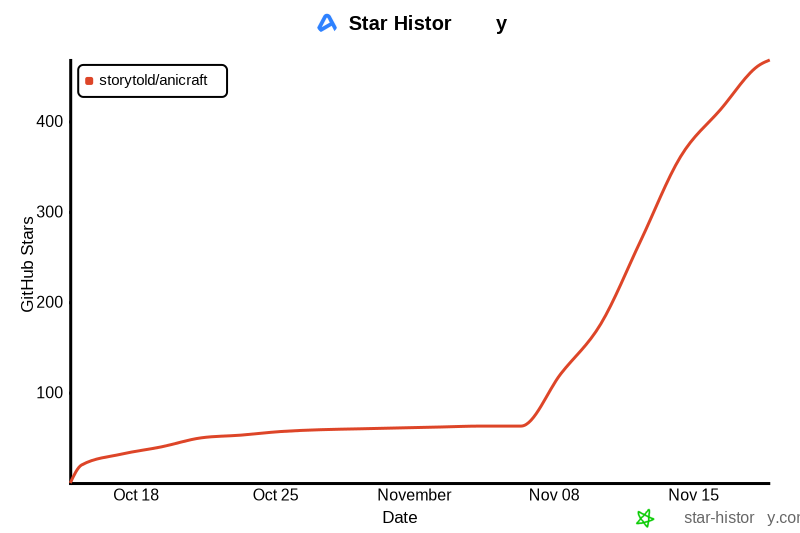](https://www.star-history.com/?repos=storytold%2Fanicraft&type=date&legend=top-left)
|
||
|
||
## License and credits
|
||
|
||
AniCraft is dual-licensed under [MIT](LICENSE-MIT) or [Apache-2.0](LICENSE-APACHE), at your option.
|
||
Copyright (c) 2026 ArtCraft Team and the AniCraft contributors. Required notices are in [NOTICE](NOTICE).
|
||
|
||
Bundled fonts, icons, images and other assets keep their own open licenses; each one is listed
|
||
with its author, source and license in [ATTRIBUTION.md](ATTRIBUTION.md).
|
||
|
||
The app icon (an engraved rabbit on AniCraft yellow, `#dac604`) is the owner's original artwork; its
|
||
palette and files are in [`assets/app-icon/`](assets/app-icon/README.md).
|
||
|
||
The ArtCraft name, wordmark and logos in [`docs/brand/`](docs/brand/) are trademarks of the
|
||
ArtCraft Team and are not covered by this license. They may be used only unmodified, and only as
|
||
part of this repository and AniCraft, under [`docs/brand/LICENSE-brand.txt`](docs/brand/LICENSE-brand.txt).
|
||
Forks and modified versions must remove them.
|
||
|
||
<sub>Adobe, Animate and Flash are trademarks or registered trademarks of Adobe Inc. in the United States and/or other countries. AniCraft is an independent, open-source project and is not affiliated with, sponsored by or endorsed by Adobe Inc.; these names are used only to describe the workflows and file formats it is compatible with.</sub>
|
||
|
||
<p align="center">
|
||
<a href="https://getartcraft.com/"><img alt="ArtCraft" src="docs/brand/artcraft-mark.svg" width="28"></a><br>
|
||
<sub>Made by the <a href="https://getartcraft.com/">ArtCraft</a> team and community.</sub>
|
||
</p>
|