mirror of
https://github.com/storytold/texturecraft.git
synced 2026-11-19 05:50:43 +01:00

344 lines
23 KiB
Markdown
344 lines
23 KiB
Markdown
<p align="center">
|
||
<a href="https://getartcraft.com/">
|
||
<picture>
|
||
<source media="(prefers-color-scheme: dark)" srcset="docs/brand/artcraft-logo-white.png">
|
||
<img alt="ArtCraft" src="docs/brand/artcraft-logo.png" width="200">
|
||
</picture>
|
||
</a>
|
||
</p>
|
||
|
||
|
||
<p align="center">
|
||
<img src="assets/app-icon/hicolor/256x256/apps/ai.storyteller.texturecraft.png" width="128" height="128" alt="TextureCraft icon: an engraved zebra on a copper tile">
|
||
</p>
|
||
|
||
<h1 align="center">TextureCraft</h1>
|
||
|
||
<p align="center">
|
||
<b>3D texture painting; an open-source, modern texture painting application, built in pure Rust.</b>
|
||
</p>
|
||
|
||
<p align="center">
|
||
A fast, open-source 3D texture painting workflow: paint PBR materials straight onto your models in
|
||
layers with masks, bake mesh maps, drive smart materials from them and export textures for any
|
||
engine. It runs natively on macOS, Windows, Linux and FreeBSD, and in the browser via WebAssembly.
|
||
Built by the ArtCraft team.
|
||
</p>
|
||
|
||
<p align="center">
|
||
<img alt="Status: in active development" src="https://img.shields.io/badge/status-in%20active%20development-c2672b?style=flat-square">
|
||
<img alt="Written in pure Rust" src="https://img.shields.io/badge/pure-Rust-b83a24?style=flat-square&logo=rust&logoColor=white">
|
||
<img alt="Runs on macOS, Windows, Linux, FreeBSD and the web" src="https://img.shields.io/badge/runs%20on-macOS%20%C2%B7%20Windows%20%C2%B7%20Linux%20%C2%B7%20FreeBSD%20%C2%B7%20Web-555555?style=flat-square">
|
||
<img alt="MCP server for agents" src="https://img.shields.io/badge/agents-MCP%20server-555555?style=flat-square">
|
||
<img alt="License: MIT OR Apache-2.0" src="https://img.shields.io/badge/license-MIT%20OR%20Apache--2.0-555555?style=flat-square">
|
||
<br>
|
||
<a href="https://sonarcloud.io/project/overview?id=storytold_texturecraft"><img alt="Scanned by SonarCloud" src="https://img.shields.io/badge/Scanned_by-SonarCloud-4b9fd5?style=flat-square&logo=sonarqubecloud&logoColor=white"></a>
|
||
<a href="https://coderabbit.ai"><img alt="Reviewed by CodeRabbit" src="https://img.shields.io/coderabbit/prs/github/storytold/texturecraft?style=flat-square&label=Reviewed%20by%20CodeRabbit&logo=coderabbit"></a>
|
||
</p>
|
||
|
||
<p align="center">
|
||
<a href="https://discord.gg/artcraft"><img alt="Join the ArtCraft community on Discord" src="https://img.shields.io/badge/Join%20us%20on%20Discord-5865F2?style=for-the-badge&logo=discord&logoColor=white" height="40"></a>
|
||
</p>
|
||
|
||
<p align="center">
|
||
<a href="https://getartcraft.com/apps/texturecraft"><b>TextureCraft on getartcraft.com</b></a> ·
|
||
<a href="https://getartcraft.com/">ArtCraft</a> ·
|
||
<a href="https://getartcraft.com/apps">All Crafting Apps</a>
|
||
</p>
|
||
|
||
<br>
|
||
|
||
<p align="center">
|
||
<img src="docs/images/texturecraft-workspace.png" alt="The TextureCraft workspace: the material library on the left; the 3D viewport and the 2D UV view of a 1970s portable TV in aged cream plastic with a hand-drawn crayon flower; and the texture set list, the layer stack with its Crayon doodle and Wear and dirt folders, and the fill layer properties on the right" width="100%">
|
||
<br><sub><b>The workspace</b>: asset shelf, 3D viewport, 2D UV view, texture sets, layer stack and properties</sub>
|
||
</p>
|
||
|
||
> [!NOTE]
|
||
> **ArtCraft is a community of artists from all walks of life.** Painters, sculptors, game
|
||
> artists, photographers, filmmakers, illustrators, designers, hobbyists, and people who picked up
|
||
> a stylus last week. If you make things, you belong here. **[Come say hi on Discord](https://discord.gg/artcraft).**
|
||
|
||
<p align="center">
|
||
<a href="#a-look-around">A look around</a> ·
|
||
<a href="#made-in-texturecraft">Made in TextureCraft</a> ·
|
||
<a href="#why-texturecraft">Why TextureCraft</a> ·
|
||
<a href="#quick-start">Quick start</a> ·
|
||
<a href="#status">Status</a> ·
|
||
<a href="#downloads">Downloads</a> ·
|
||
<a href="#the-crafting-apps">The Crafting Apps</a> ·
|
||
<a href="#license-and-credits">License</a>
|
||
</p>
|
||
|
||
## A look around
|
||
|
||
<table>
|
||
<tr>
|
||
<td width="50%" valign="top">
|
||
<img src="docs/images/texturecraft-bake.png" alt="Bake mode on the portable TV: its seven texture sets and the mesh map bakers on the left, the common bake parameters below them, and the Bake selected textures button under the viewport" width="100%">
|
||
<p align="center"><sub><b>Bake mesh maps</b>: ambient occlusion, curvature, thickness and more, ray traced on the GPU</sub></p>
|
||
</td>
|
||
<td width="50%" valign="top">
|
||
<img src="docs/images/texturecraft-export.png" alt="The Export textures dialog: texture sets to export, the output directory, an output template, file type, size, padding and normal map format" width="100%">
|
||
<p align="center"><sub><b>Export textures</b>: presets for common engines, or your own output templates with channel packing</sub></p>
|
||
</td>
|
||
</tr>
|
||
<tr>
|
||
<td width="50%" valign="top">
|
||
<img src="docs/images/texturecraft-rendering.png" alt="Rendering mode: the portable TV path traced on the GPU at 256 samples with denoising, the curved screen catching the studio light, and the render settings in a card over the viewport" width="100%">
|
||
<p align="center"><sub><b>Rendering mode</b> (F10): your textures path traced on the GPU, with a denoiser</sub></p>
|
||
</td>
|
||
<td width="50%" valign="top">
|
||
<img src="docs/images/texturecraft-light.png" alt="TextureCraft in the light brightness level with the blue accent: the same panels as tiles on a light background around the dark 3D viewport" width="100%">
|
||
<p align="center"><sub><b>Light theme</b>: four brightness levels and seven accent colours</sub></p>
|
||
</td>
|
||
</tr>
|
||
</table>
|
||
|
||
## Made in TextureCraft
|
||
|
||
Two original props, modelled procedurally by contributors, textured layer by layer with TextureCraft's
|
||
own materials, masks and mesh-map generators (no textures or models from anywhere else) and path
|
||
traced on the GPU by `texturecraft-cli render`.
|
||
|
||
<table>
|
||
<tr>
|
||
<td width="50%" valign="top">
|
||
<img src="docs/images/texturecraft-lantern.png" alt="A path-traced storm lantern on a dark stage: red enamel chipped to bare steel on the edges, rust and grime in the seams, a cream pinstripe, a tarnished brass burner and knob, rusty guard wires and a glowing flame behind the glass globe" width="100%">
|
||
<p align="center"><sub><b>Storm lantern</b>: chipped enamel, rust, soot and a lit flame over eight texture sets</sub></p>
|
||
</td>
|
||
<td width="50%" valign="top">
|
||
<img src="docs/images/texturecraft-camera.png" alt="A path-traced vintage rangefinder camera: black enamel worn through to brass along the edges and corners of the top plate, cognac leatherette, knurled chrome dials, a black lens barrel with an engraved distance scale and a coated front element" width="100%">
|
||
<p align="center"><sub><b>Rangefinder camera</b>: black paint brassing, leatherette, chrome and coated glass</sub></p>
|
||
</td>
|
||
</tr>
|
||
</table>
|
||
|
||
## Why TextureCraft
|
||
|
||
- **Familiar.** The layout, tools, menus, panels and shortcuts texture artists already know: texture
|
||
sets, a layer stack with per-channel blending, masks and generators, smart materials, the tool
|
||
shelf, the 3D and 2D views. You already know how to use it.
|
||
- **Fast.** A tiled, copy-on-write texel engine on every CPU core and a wgpu viewport (Vulkan,
|
||
Metal, DX12, WebGPU). Mesh maps bake on the GPU about 12× faster than on the CPU, Rendering mode
|
||
path traces about 25× faster, and 8K texture sets stay responsive while you paint.
|
||
- **Seamless.** Brush stamps live on the 3D surface, so strokes flow across UV seams, and the
|
||
camera's visibility keeps paint off the back of your model.
|
||
- **Robust.** No panics in shipped code, every command tested with hostile input, unlimited undo
|
||
from copy-on-write snapshots, and lossless `.tcraft` projects.
|
||
- **Open.** glTF/GLB, FBX, COLLADA, USD, Alembic, OBJ, PLY and STL in; PNG, JPEG, TGA, TIFF, BMP,
|
||
WEBP, EXR and HDR textures out at 8, 16 or 32 bits, with UDIM tiles; textured OBJ, GLB and USD
|
||
mesh export. Every material, environment, brush alpha and built-in mesh is procedural.
|
||
- **Works with MaterialCraft.** Node-based materials from
|
||
[MaterialCraft](https://github.com/storytold/materialcraft) (`.mcmat`, sent straight to the
|
||
shelf) paint and fill like any material, and their graph inputs stay sliders, colors and
|
||
presets here: each change re-cooks the material at the texture set's resolution, with this
|
||
mesh's baked maps feeding the graph.
|
||
- **Agent-native.** Every menu item and tool is a command you can drive from the CLI, a JSON
|
||
control channel or an **MCP server**, so Claude and other agents can paint, bake and export the
|
||
way a person does.
|
||
- **Everywhere.** One codebase for the desktop apps and the same UI in the browser.
|
||
|
||
The full list of what's in it is in [`docs/features.md`](docs/features.md).
|
||
|
||
## Quick start
|
||
|
||
```sh
|
||
git clone https://github.com/storytold/texturecraft
|
||
cd texturecraft
|
||
|
||
cargo run --release -p texturecraft # desktop app (opens a sample project)
|
||
cargo run --release -p texturecraft -- model.glb # a new project from a mesh
|
||
cargo run --release -p texturecraft -- --control 7878 # + JSON control channel
|
||
cargo run --release -p texturecraft-cli -- mcp # MCP server (stdio)
|
||
cargo run --release -p texturecraft-cli -- new builtin:crate crate.tcraft --sample
|
||
cargo run --release -p texturecraft-cli -- render crate.tcraft crate.png --samples 256 # path traced
|
||
cargo run --release -p texturecraft-cli -- export crate.tcraft textures # headless export
|
||
cd apps/texturecraft-web && trunk serve # web build
|
||
cargo xtask ci # fmt, clippy, tests, layering, wasm
|
||
```
|
||
|
||
You need Rust 1.95 or newer. The app opens with a baked sample project and a start window (new project, open, recent projects); **File ▸ New project** starts
|
||
from a built-in mesh, a project template or your own mesh file (UVs are generated if it has none).
|
||
|
||
Japanese, Chinese, Korean and Arabic interface text uses the fonts of
|
||
[storytold/craft-fonts](https://github.com/storytold/craft-fonts) where it has them, an optional
|
||
build input (releases always use it): `CRAFT_FONTS_DIR="$PWD/../craft-fonts" cargo run --release -p texturecraft`
|
||
(an absolute path). Without it, the desktop app uses the installed system fonts.
|
||
|
||
If the app cannot start (no usable GPU, say) or has to close, it says why in a message box and
|
||
appends the details to `errors.log` beside its settings (`%APPDATA%\TextureCraft\data` on Windows,
|
||
`~/Library/Application Support/TextureCraft` on macOS, `~/.local/share/texturecraft` on Linux).
|
||
On a machine with several GPUs, `--gpu <part of the name>` or `--power-pref high` picks one.
|
||
|
||
### Use it from Claude Code and other agents
|
||
|
||
Register the MCP server with Claude Code, giving it the folders it may read and write:
|
||
|
||
```sh
|
||
claude mcp add texturecraft -- /path/to/texturecraft-cli mcp --read-root /work/project --write-root /work/project
|
||
```
|
||
|
||
To drive the running app instead, start it with `--control 7878` and bridge to it:
|
||
|
||
```sh
|
||
claude mcp add texturecraft-app -- /path/to/texturecraft-cli mcp --bridge 7878
|
||
```
|
||
|
||
The details are in [`docs/control-protocol.md`](docs/control-protocol.md).
|
||
|
||
## Status
|
||
|
||
TextureCraft is under active development. [**ROADMAP.md**](ROADMAP.md) has the parity estimate by
|
||
area, the remaining work and what's next.
|
||
|
||
**Where we are (2026-11-01):** we estimate about 93% of a texture artist's daily workflow works end
|
||
to end, weighted by how much of the day each area carries: importing meshes, texture sets and UDIM
|
||
tiles, the layer stack with masks, effects and smart materials, every painting tool, baking, the PBR
|
||
viewport and Rendering mode, export presets and templates, and the full menu set. The interface
|
||
speaks English, French, German, Spanish, Portuguese, Italian, Japanese, Chinese, Korean and Arabic;
|
||
[localization-parity.md](docs/localization-parity.md) has the details. The scores are self-assessed
|
||
from our code against public documentation.
|
||
|
||
**What's missing:**
|
||
- hardware ray tracing in Rendering mode;
|
||
- pen tilt, and pen pressure on Linux, macOS and desktop browsers (the windowing layer doesn't
|
||
report them yet);
|
||
- Alembic files in the older HDF5 container, and Alembic animation (the first sample is read);
|
||
- a native-speaker review of the translations;
|
||
- the first signed release on every platform.
|
||
|
||
**Where we're going:** the first release, v0.1.0, on every platform; then the remaining rendering
|
||
and file format gaps. The ranked list is in [`ROADMAP.md`](ROADMAP.md).
|
||
|
||
**Workspace:** `crates/{core, texel, geom, compose, bake, paint, formats, engine, render, automation, ui-egui}`
|
||
and `apps/{texturecraft, texturecraft-cli, texturecraft-web}`. The egui frontend is its own crate, so
|
||
the UI can be swapped without touching the engine; [`docs/architecture.md`](docs/architecture.md)
|
||
explains how it fits together.
|
||
|
||
Agent and contributor rules (clean room, the asset policy, no panics in shipped code, quality gates)
|
||
are in [`AGENTS.md`](AGENTS.md), and [`docs/releasing.md`](docs/releasing.md) explains how releases
|
||
are built, signed and published. Every bundled asset is listed with its licence in
|
||
[`ATTRIBUTION.md`](ATTRIBUTION.md).
|
||
|
||
## Downloads
|
||
|
||
**New to TextureCraft?** Download it from the [TextureCraft page on getartcraft.com](https://getartcraft.com/apps/texturecraft). That's the easiest way to install it.
|
||
|
||
**Want a specific build or format?** On GitHub, the [latest release](https://github.com/storytold/texturecraft/releases/latest) has every build listed below, and [all releases](https://github.com/storytold/texturecraft/releases) has earlier versions and their notes. `<ver>` in the file names is the version number, and `SHA256SUMS.txt` lists a checksum for every file.
|
||
|
||
### Windows
|
||
|
||
| Build | Installer | Portable |
|
||
|---|---|---|
|
||
| x64 (64-bit Intel/AMD) | `texturecraft-<ver>-windows-x64.msi` | `texturecraft-<ver>-windows-x64-portable.zip` |
|
||
| arm64 (Snapdragon and other ARM PCs) | `texturecraft-<ver>-windows-arm64.msi` | `texturecraft-<ver>-windows-arm64-portable.zip` |
|
||
| x86 (32-bit) | `texturecraft-<ver>-windows-x86.msi` | `texturecraft-<ver>-windows-x86-portable.zip` |
|
||
|
||
### macOS
|
||
|
||
| Build | File | Notes |
|
||
|---|---|---|
|
||
| App, universal (Apple silicon + Intel) | `texturecraft-<ver>-macos-universal.dmg` | Signed and notarized |
|
||
| Command-line tool, universal | `texturecraft-cli-<ver>-macos-universal.zip` | Signed and notarized |
|
||
|
||
### Linux
|
||
|
||
| Format | x86_64 | aarch64 (ARM64) | Notes |
|
||
|---|---|---|---|
|
||
| AppImage | `texturecraft-<ver>-linux-x86_64.AppImage` | `texturecraft-<ver>-linux-aarch64.AppImage` | Runs anywhere; updates itself with [AppImageUpdate](https://github.com/AppImageCommunity/AppImageUpdate) (`.zsync` files) |
|
||
| Flatpak | `texturecraft-<ver>-linux-x86_64.flatpak` | `texturecraft-<ver>-linux-aarch64.flatpak` | Sandboxed; `flatpak install --user <file>` |
|
||
| Debian/Ubuntu | `texturecraft-<ver>-linux-x86_64.deb` | `texturecraft-<ver>-linux-aarch64.deb` | |
|
||
| Fedora/RHEL/openSUSE | `texturecraft-<ver>-linux-x86_64.rpm` | `texturecraft-<ver>-linux-aarch64.rpm` | |
|
||
| Tarball | `texturecraft-<ver>-linux-x86_64.tar.gz` | `texturecraft-<ver>-linux-aarch64.tar.gz` | Unpack anywhere |
|
||
|
||
### FreeBSD
|
||
|
||
| Build | File |
|
||
|---|---|
|
||
| x86_64 | `texturecraft-<ver>-freebsd-x86_64.tar.gz` |
|
||
|
||
### Web (WebAssembly)
|
||
|
||
| Build | File | Notes |
|
||
|---|---|---|
|
||
| Static site | `texturecraft-web-<ver>.zip` | Runs in a modern browser; host it on any static server |
|
||
|
||
## The Crafting Apps
|
||
|
||
TextureCraft is one of the **Crafting Apps**: free, open-source creative tools from the
|
||
[ArtCraft](https://getartcraft.com/) team, each written from scratch in Rust and each able to
|
||
stand on its own.
|
||
|
||
| | App | What it's for | Code | Learn more |
|
||
|:-:|---|---|---|---|
|
||
| <img src="https://raw.githubusercontent.com/storytold/photocraft/main/assets/app-icon/hicolor/64x64/apps/ai.storyteller.photocraft.png" alt="" width="32" height="32"> | **PhotoCraft** | Image editing: layers, masks, type and real PSD files | [GitHub](https://github.com/storytold/photocraft) | [Website](https://getartcraft.com/apps/photocraft) |
|
||
| <img src="https://raw.githubusercontent.com/storytold/vectorcraft/main/assets/app-icon/hicolor/64x64/apps/ai.storyteller.vectorcraft.png" alt="" width="32" height="32"> | **VectorCraft** | Vector illustration | [GitHub](https://github.com/storytold/vectorcraft) | [Website](https://getartcraft.com/apps/vectorcraft) |
|
||
| <img src="https://raw.githubusercontent.com/storytold/filmcraft/main/assets/app-icon/hicolor/64x64/apps/ai.storyteller.filmcraft.png" alt="" width="32" height="32"> | **FilmCraft** | Video editing, color and sound | [GitHub](https://github.com/storytold/filmcraft) | [Website](https://getartcraft.com/apps/filmcraft) |
|
||
| <img src="https://raw.githubusercontent.com/storytold/lightcraft/main/assets/app-icon/hicolor/64x64/apps/ai.storyteller.lightcraft.png" alt="" width="32" height="32"> | **LightCraft** | Photo library and raw development | [GitHub](https://github.com/storytold/lightcraft) | [Website](https://getartcraft.com/apps/lightcraft) |
|
||
| <img src="https://raw.githubusercontent.com/storytold/pdfcraft/main/assets/app-icon/hicolor/64x64/apps/ai.storyteller.pdfcraft.png" alt="" width="32" height="32"> | **PdfCraft** | Reading, organizing and protecting PDFs | [GitHub](https://github.com/storytold/pdfcraft) | [Website](https://getartcraft.com/apps/pdfcraft) |
|
||
| <img src="https://raw.githubusercontent.com/storytold/effectcraft/main/assets/app-icon/hicolor/64x64/apps/ai.storyteller.effectcraft.png" alt="" width="32" height="32"> | **EffectCraft** | Motion graphics and visual effects | [GitHub](https://github.com/storytold/effectcraft) | [Website](https://getartcraft.com/apps/effectcraft) |
|
||
| <img src="https://raw.githubusercontent.com/storytold/designcraft/main/assets/app-icon/hicolor/64x64/apps/ai.storyteller.designcraft.png" alt="" width="32" height="32"> | **DesignCraft** | Page layout and publishing | [GitHub](https://github.com/storytold/designcraft) | [Website](https://getartcraft.com/apps/designcraft) |
|
||
| <img src="https://raw.githubusercontent.com/storytold/figcraft/main/assets/app-icon/hicolor/64x64/apps/ai.storyteller.figcraft.png" alt="" width="32" height="32"> | **FigCraft** | Interface design and prototyping | [GitHub](https://github.com/storytold/figcraft) | [Website](https://getartcraft.com/apps/figcraft) |
|
||
| <img src="https://raw.githubusercontent.com/storytold/wordcraft/main/assets/app-icon/hicolor/64x64/apps/ai.storyteller.wordcraft.png" alt="" width="32" height="32"> | **WordCraft** | Word processing and documents | [GitHub](https://github.com/storytold/wordcraft) | [Website](https://getartcraft.com/apps/wordcraft) |
|
||
| <img src="https://raw.githubusercontent.com/storytold/soundcraft/main/assets/app-icon/hicolor/64x64/apps/ai.storyteller.soundcraft.png" alt="" width="32" height="32"> | **SoundCraft** | Audio recording and editing | [GitHub](https://github.com/storytold/soundcraft) | [Website](https://getartcraft.com/apps/soundcraft) |
|
||
| <img src="https://raw.githubusercontent.com/storytold/deckcraft/main/assets/app-icon/hicolor/64x64/apps/ai.storyteller.deckcraft.png" alt="" width="32" height="32"> | **DeckCraft** | Presentations and slide decks | [GitHub](https://github.com/storytold/deckcraft) | [Website](https://getartcraft.com/apps/deckcraft) |
|
||
| <img src="https://raw.githubusercontent.com/storytold/cadcraft/main/assets/app-icon/hicolor/64x64/apps/ai.storyteller.cadcraft.png" alt="" width="32" height="32"> | **CADCraft** | Computer-aided design | [GitHub](https://github.com/storytold/cadcraft) | [Website](https://getartcraft.com/apps/cadcraft) |
|
||
| <img src="https://raw.githubusercontent.com/storytold/gridcraft/main/assets/app-icon/hicolor/64x64/apps/ai.storyteller.gridcraft.png" alt="" width="32" height="32"> | **GridCraft** | Spreadsheets and data | [GitHub](https://github.com/storytold/gridcraft) | [Website](https://getartcraft.com/apps/gridcraft) |
|
||
| <img src="https://raw.githubusercontent.com/storytold/texturecraft/main/assets/app-icon/hicolor/64x64/apps/ai.storyteller.texturecraft.png" alt="" width="32" height="32"> | **TextureCraft** | 3D texture painting | [GitHub](https://github.com/storytold/texturecraft) | [Website](https://getartcraft.com/apps/texturecraft) |
|
||
| <img src="https://raw.githubusercontent.com/storytold/craft-anything/main/assets/app-icon/hicolor/64x64/apps/ai.storyteller.craft-anything.png" alt="" width="32" height="32"> | **Craft Anything** | See how any software works, then build your own | [GitHub](https://github.com/storytold/craft-anything) | [Website](https://getartcraft.com/apps/craft-anything) |
|
||
| <img src="https://raw.githubusercontent.com/tangency-labs/solidcraft/main/assets/icons/app/linux/exports/hicolor/64x64/apps/io.tangencylabs.solidcraft.png" alt="" width="32" height="32"> | **SolidCraft** | Parametric 3D CAD by Tangency Labs (community app) | [GitHub](https://github.com/tangency-labs/solidcraft) | |
|
||
|
||
And [**ArtCraft**](https://getartcraft.com/) itself, our AI image and video studio for artists who want real control.
|
||
|
||
<br>
|
||
|
||
<p align="center">
|
||
<a href="https://discord.gg/artcraft"><img alt="Join the ArtCraft community on Discord" src="https://img.shields.io/badge/Join%20us%20on%20Discord-5865F2?style=for-the-badge&logo=discord&logoColor=white" height="40"></a>
|
||
</p>
|
||
|
||
<h3 align="center">Come make things with us</h3>
|
||
|
||
<p align="center">
|
||
Our Discord is where artists of every kind hang out: people who paint, sculpt, model, shoot, draw,
|
||
cut film, set type, and people still figuring out what they like to make. Share what you're
|
||
working on, ask for help, tell us what's broken, or tell us what you wish these tools could do.
|
||
Whatever your medium and however long you've been at it, you're welcome here.
|
||
</p>
|
||
|
||
<p align="center">
|
||
<a href="https://discord.gg/artcraft"><b>discord.gg/artcraft</b></a> ·
|
||
<a href="https://getartcraft.com/">getartcraft.com</a> ·
|
||
<a href="https://getartcraft.com/apps">The Crafting Apps</a> ·
|
||
<a href="https://getartcraft.com/apps/texturecraft">TextureCraft</a>
|
||
</p>
|
||
|
||
## Star history
|
||
|
||
[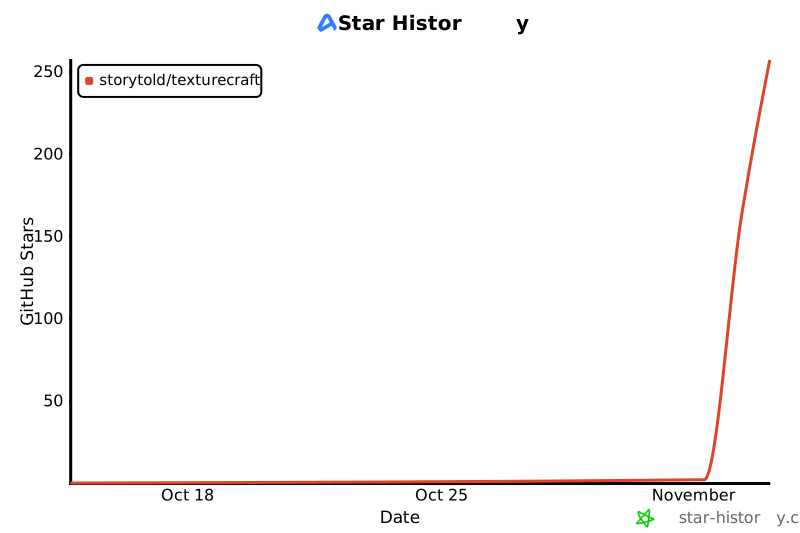](https://www.star-history.com/?repos=storytold%2Ftexturecraft&type=date&legend=top-left)
|
||
|
||
## License and credits
|
||
|
||
TextureCraft is dual-licensed under [MIT](LICENSE-MIT) or [Apache-2.0](LICENSE-APACHE), at your option.
|
||
Copyright (c) 2026 ArtCraft Team and the TextureCraft contributors. Required notices are in [NOTICE](NOTICE).
|
||
|
||
Bundled fonts, icons, images and other assets keep their own open licenses; each one is listed
|
||
with its author, source and license in [ATTRIBUTION.md](ATTRIBUTION.md). Release builds also embed
|
||
the fonts of [craft-fonts](https://github.com/storytold/craft-fonts/blob/main/ATTRIBUTION.md)
|
||
(Japanese and Simplified Chinese faces; SIL Open Font License 1.1).
|
||
|
||
Every material, environment, brush alpha and mesh shown is generated procedurally by TextureCraft
|
||
itself; no third-party textures or models appear in the screenshots.
|
||
|
||
The app icon (an engraved zebra on TextureCraft copper, `#c2672b`) is the owner's original artwork;
|
||
its files are in [`assets/app-icon/`](assets/app-icon/).
|
||
|
||
The ArtCraft name, wordmark and logos in [`docs/brand/`](docs/brand/) are trademarks of the
|
||
ArtCraft Team and are not covered by this license. They may be used only unmodified, and only as
|
||
part of this repository and TextureCraft, under [`docs/brand/LICENSE-brand.txt`](docs/brand/LICENSE-brand.txt).
|
||
Forks and modified versions must remove them.
|
||
|
||
<p align="center">
|
||
<a href="https://getartcraft.com/"><img alt="ArtCraft" src="docs/brand/artcraft-mark.png" width="28"></a><br>
|
||
<sub>Made by the <a href="https://getartcraft.com/">ArtCraft</a> team and community.</sub>
|
||
</p>
|